ODosta Inc. Create Your Own Tech World

If you’ve ever bought a new laptop, upgraded your operating system, or installed Microsoft Office for the first time, you’ve likely encountered something called product activation. For many people, it’s a quick step that takes just a few minutes. For others, it can feel confusing, especially when error messages appear or product keys don’t work as expected. In this guide, we’ll walk through everything you need to know about Microsoft product activation online for Windows and Office, how it works, why it matters, and how to solve common problems.
What Is Microsoft Product Activation?
Microsoft product activation is a verification process that confirms your copy of Windows or Office is genuine and properly licensed. When you activate online, your product key (or digital license) is validated with Microsoft’s servers to ensure it hasn’t been used on more devices than allowed.
Activation helps protect users from counterfeit software and ensures you receive updates, security patches, and full feature access.
Whether you’re using Microsoft Windows or Microsoft Office, activation is an essential step after installation.
Why Online Activation Is Important
Years ago, activation often required phone calls and manual confirmation codes. Today, online activation is usually automatic and takes just seconds if your device is connected to the internet.
Here’s why it matters:
1. Access to Updates
Activated Windows and Office installations receive security updates and performance improvements. Without activation, your system may be limited in functionality.
2. Full Feature Unlock
An inactivated copy of Windows may display watermarks or restrict personalization settings. Office apps may enter reduced functionality mode.
3. Security & Authenticity
Activation confirms you’re using genuine Microsoft software, reducing the risk of malware hidden in pirated copies.
How Windows Activation Works Online
With modern versions like Windows 10 and Windows 11, activation is smoother than ever.
Digital License (Most Common Method)
Many users don’t even need to enter a product key anymore. If your PC came pre-installed with Windows, it likely uses a digital license tied to your hardware.
When you connect to the internet:
-
Windows automatically contacts Microsoft’s activation servers.
-
The license is verified.
-
Your system activates in the background.
You can check activation status by going to:
Settings > System > Activation
If it says “Windows is activated,” you’re good to go.
Activation Using a Product Key
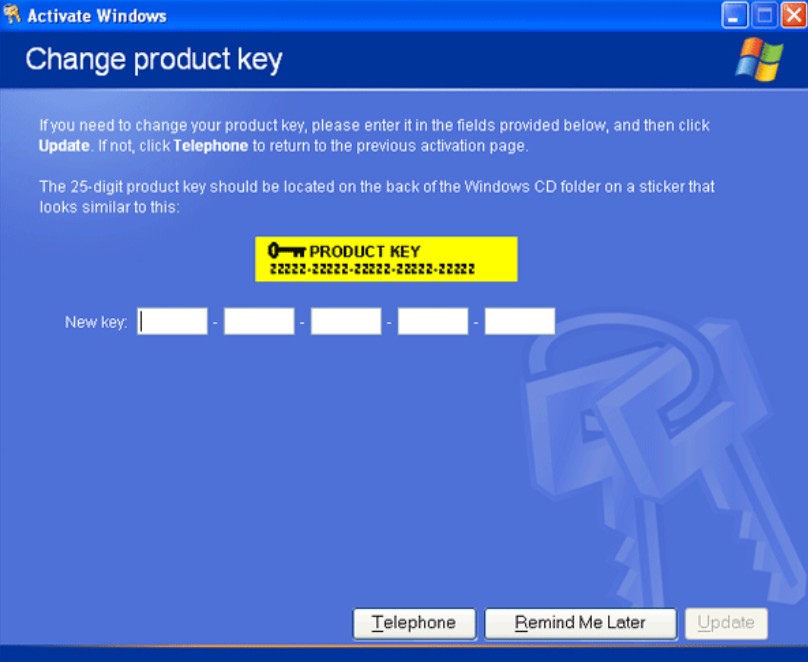
If you purchased a retail copy of Windows, you’ll receive a 25-character product key. To activate:
-
Open Settings
-
Go to System > Activation
-
Click “Change product key”
-
Enter your 25-character key
-
Follow the prompts
Once verified online, Windows activates instantly.
How Microsoft Office Activation Works Online
Office activation depends on how you purchased it. There are two common scenarios:
1. Microsoft Account-Based Activation (Microsoft 365)
If you subscribe to Microsoft 365, your license is tied to your Microsoft account rather than a product key.
After installing Office:
-
Open any app (Word, Excel, PowerPoint)
-
Sign in with your Microsoft account
-
Office verifies your subscription online
-
Activation completes automatically
This method is simple and convenient, especially if you switch devices.
2. One-Time Purchase (Office 2021 or Earlier)
If you bought a standalone version such as Microsoft Office 2021, you’ll use a product key.
Main Steps:
-
Visit setup.office.com
-
Sign in with your Microsoft account
-
Enter your 25-character key
-
Download and install Office
-
Open an app and sign in to complete activation
Once activated, your license links to your Microsoft account for easier reinstallations in the future.
Common Activation Problems (And Fixes)
Even though online activation is straightforward, issues sometimes occur. Here are common problems and solutions:
“Windows Is Not Activated” Message
Possible causes:
-
Internet connection issues
-
Hardware changes (like motherboard replacement)
-
Incorrect product key
Ho to Fix:
-
Check your internet connection
-
Run the Activation Troubleshooter
-
Re-enter your product key
-
Sign in with the Microsoft account linked to your license
If you recently changed hardware, you may need to use the “I changed hardware on this device recently” option in Activation settings.
Invalid Product Key Error
This often happens when:
-
The key was mistyped
-
The key was already used on too many devices
-
The key doesn’t match the installed version
Make sure:
-
You’re entering characters correctly (B vs 8, G vs 6)
-
The key matches your Windows or Office edition
-
You purchased from a trusted seller
Office Reduced Functionality Mode
If Office apps open but won’t let you edit documents:
-
Sign out and back into your Microsoft account
-
Ensure your subscription is active
-
Check your internet connection
-
Reinstall Office if necessary
What Happens If You Don’t Activate?
For Windows:
-
A watermark appears on the desktop
-
Personalization features may be restricted
-
You’ll receive reminders to activate
For Office:
-
You can view documents but not edit
-
Frequent activation prompts appear
While your system won’t completely stop working, activation ensures full functionality and peace of mind.
Tips for Smooth Online Activation
To avoid problems, you should follow these best practices:
Buy From Authorized Sellers
Always purchase Windows and Office licenses from Microsoft directly or certified distributors.
Keep Your Product Key Safe
Store it in your email, password manager, or Microsoft account dashboard.
Link Licenses to Your Microsoft Account
This makes reactivation easier after reinstalling Windows or replacing hardware.
Use the Correct Edition
A Windows Home key won’t activate Windows Pro, and vice versa.
Is Online Activation Safe?
Yes, as long as you’re activating through official Microsoft channels. Online activation communicates securely with Microsoft servers and does not expose your personal files.
Be cautious of:
-
Third-party “activation tools”
-
Cracked software
-
Suspicious discount license websites
These often lead to security risks and future deactivation issues.
The Future of Microsoft Activation
Microsoft continues to move toward account-based licensing rather than standalone product keys. With cloud integration and subscription services becoming standard, activation is becoming nearly invisible for users. In many cases, you simply sign in and everything works. That’s the direction Microsoft is heading: seamless access, fewer manual steps, and stronger protection against piracy.
Online Activation Types
For a quick overview, here is a summary of the activation methods available:
| Activation Type | Supported Product | Activation Period | Internet Needed? | More Info |
|---|---|---|---|---|
| HWID | Windows 10-11 | Permanent | Yes | Buy Now |
| KMS | Windows 10-11 | 180 Days (Manual) | Yes | Buy Now |
| Ohook | Office | Permanent | No | Buy Now |
| TSforge | Windows / ESU / Office | Permanent | Yes (on build 19041+) | Buy Now |
| KMS38 | Windows 10-11-Server | Until 2038 | No | Buy Now |
| Online KMS | Windows / Office | 180 Days (Lifetime with Renewal) | Yes | Buy Now |
Microsoft Activation Scripts (MAS)
Open-source Windows and Office activator featuring HWID, Ohook, TSforge, and Online KMS activation methods, along with advanced troubleshooting.
How to Activate Windows / Office / Extended Security Updates (ESU)?
Method 1 – PowerShell
-
Click the Start Menu, type
PowerShell, and open it. -
Copy and paste the code below and press Enter.
- For Windows 8.1, 10 and 11:
irm https://get.activated.win | iexIf the above is blocked (by ISP/DNS), try this (needs updated Windows 10 or 11):
iex (curl.exe -s --doh-url https://1.1.1.1/dns-query https://get.activated.win | Out-String) - Script not launching? Use the below-listed Method 2.
- For Windows 8.1, 10 and 11:
-
In the menu that appears, type the number corresponding to one of the Green options.
Method 2 – Traditional (Windows Vista and later)
- Download the script:
- MAS_AIO.cmd (Direct script)
- MAS_AIO.zip (If the direct script is blocked by your browser)
- Run the
MAS_AIO.cmdfile. - In the menu that appears, type the number corresponding to one of the Green options.
Please note:
- Some ISPs/DNS providers block access to our domains. You can bypass this by enabling DNS-over-HTTPS (DoH) in your browser.
- The
irmcommand in PowerShell downloads a script from a specified URL, and theiexcommand executes it. - Always double-check the URL before executing the command and verify the source is trustworthy when manually downloading files.
- Be cautious of third parties spreading malware disguised as MAS by altering the URL in the PowerShell command.
You can also check Activation Methods Chart.
Conclusion
Microsoft product activation online for Windows and Office might sound technical, but in most cases, it’s a quick and automatic process. Whether you’re setting up a new PC, upgrading to Windows 11, or installing Office for work or school, activation ensures your software is genuine, secure, and fully functional. If you run into issues, remember that most problems are fixable with simple troubleshooting steps and linking your license to your Microsoft account can save you a lot of hassle down the road.
At the end, activation isn’t just about compliance. It’s about security, reliability, and making sure your tools work exactly the way they’re meant to.